Voter ID Card Online Download: in today’s time, an identity card is very important for every Indian citizen. Whether it is banking work, taking benefit of government schemes, or casting your vote during elections, an ID proof is required everywhere. Voter ID Card is one of the most important identity documents in India. But many times, when we need it urgently, the physical voter card is lost or not available at home.
Now there is no need to worry. The Election Commission of India (ECI) has made it very easy to download Voter ID Card online. You can download your Digital Voter ID Card (e-EPIC) at home within a few minutes using your mobile or computer.
What is e-EPIC (Digital Voter ID Card)?
e-EPIC is the digital version of your physical Voter ID Card. It is issued by the Election Commission of India and is completely valid, just like the original voter card.
With e-EPIC, you can
- Save your voter ID on your mobile phone.
- Take a printout whenever required.
- Use it at polling booths and for other government works.
- Show it digitally through mobile, DigiLocker, or email.
- The best part is that the digital voter ID card is accepted everywhere.
Things Required to Download Voter ID Card Online
Before starting the online download process, keep these things ready –
- Mobile number linked with your Voter ID
- OR EPIC number / registered email ID
- Internet connection (mobile or computer)
If your mobile number is linked with your voter ID, the process becomes very fast and simple.
Voter ID Card Download Online PDF, Step-by-Step Guide
You do not need to visit a cyber café or contact a BLO. Just follow the simple steps given below and download your voter ID card yourself.
- Step 1 , Go to the official website of the Election Commission of India
- www.eci.gov.in or https://demovoters.eci.gov.in/
- Step 2 , On the homepage, click on the Menu option visible at the top.
- Step 3 , From menu, choose the Download e-EPIC option.
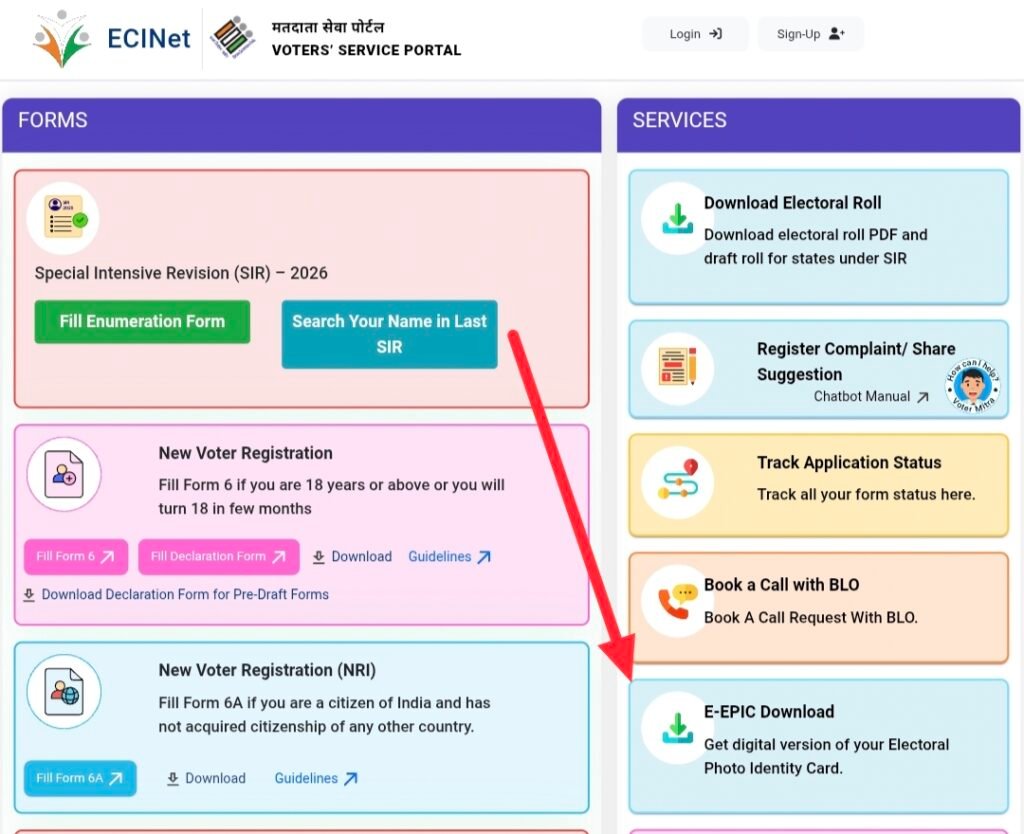
- Step 4 , a new page will open. Scroll down and go to the Service section.
- Step 5 , Now click on the e-EPIC Download link.
- Step 6 , Fill in the required information such as
- Registered mobile number / email ID / EPIC number
- Password
- Captcha code
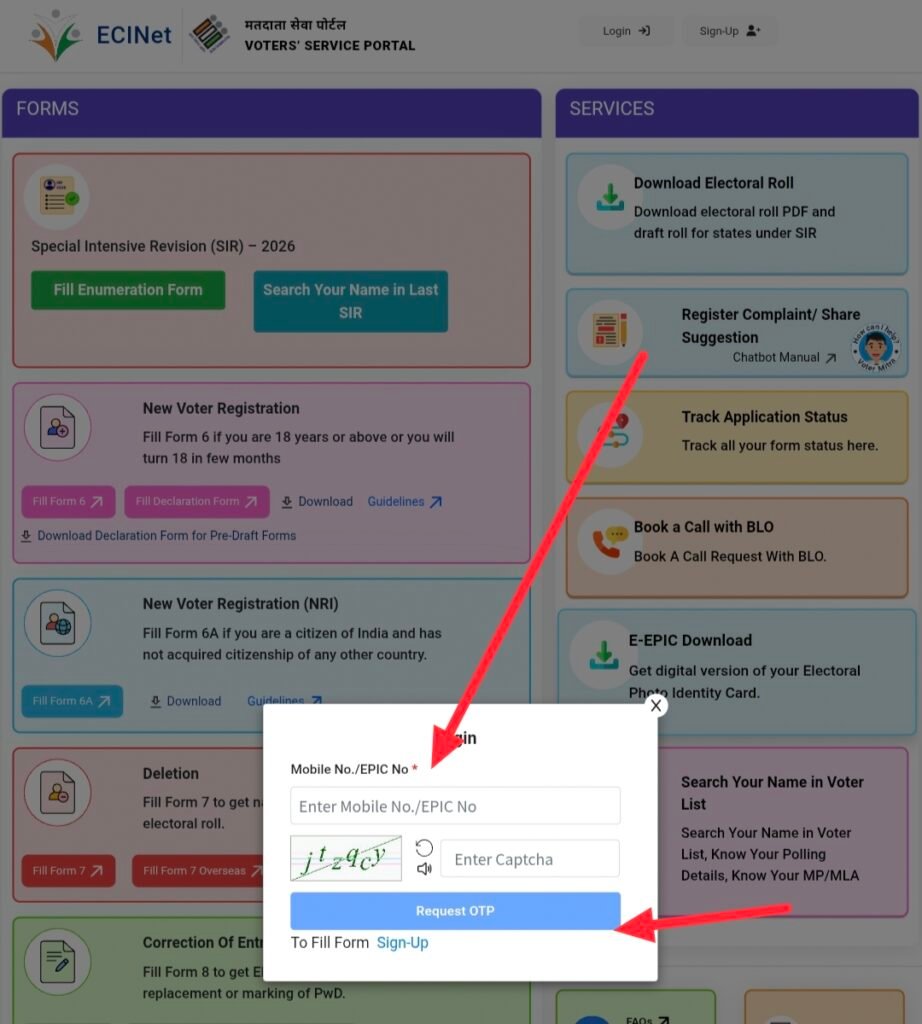
- Step 7 , After that, click on Request OTP you will receive an OTP on your registered mobile number. Enter the OTP and click on Verify & Login.
- Step 8 , After login, select your State and enter your EPIC number, then click on Search.
- Step 9 , your voter details will appear on the screen. Click on Download EPIC.
Your digital voter ID card will be downloaded in PDF format.
Save Your Digital Voter ID for Future Use
Once downloaded, you can easily save your e-EPIC on your mobile phone. You can also share or show it using WhatsApp, email, DigiLocker, or any other digital platform. This way, you do not have to worry about carrying your physical voter card everywhere.
Be Ready Before Voting Day
Voting is not only a right but also a responsibility of every Indian citizen. To avoid last-minute problems, make sure your voter ID card is ready before elections. If your physical card is lost or misplaced, digital voter ID (e-EPIC) is the best solution.
If you have not applied for a voter ID yet, you can also apply online for a new voter card easily through the Election Commission website.